Raycast
The VRCRaycast component in VRChat allow avatars to fire rays through the scene that hit against colliders in the world or against players. A transform is positioned at the point the raycast hits.
Component Properties
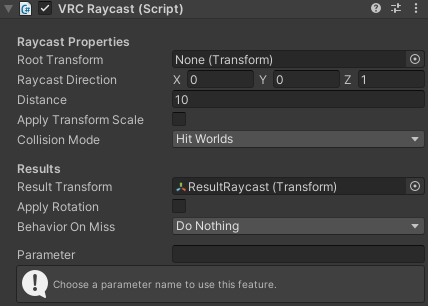
The following table lists all the parameters you can configure:
| Property | Description | |
|---|---|---|
| Root Transform | The transform to start the raycast from. If empty, the transform this component is attached to will be used instead. | |
| Raycast Direction | The direction to cast the ray in. This is applied in local space, so it will be affected by the rotation of the transform. | |
| Distance | The maximum distance the raycast is able to travel. If you set this to zero, the raycast will travel as far as possible (1000 units). | |
| Apply Transform Scale | If this property is enabled, the lossy Z scale of the transform the ray starts from will affect the raycast distance. | |
| Collision Mode | Controls the layers this raycast component will collide against: You can have it collide against layers used in worlds, layers used on player colliders, or both at once. You can also manually define the specific layers to collide with for advanced use cases. | |
| Hit Worlds | The ray will collide with the Default and Environment layers as well as all of the user controlled layers. (Default) | |
| Hit Players | The ray will collide with Player and PlayerLocal layers. | |
| Hit Worlds And Players | The ray will collide with both worlds and players, combining the layers of the two options above. | |
| Hit Custom Layers | The ray will collide with a set of layers that you manually specify. | |
| Custom Collision Layers | The custom set of layers to use when Collision Mode is set to Hit Custom Layers. This property is hidden when not using custom layers. | |
| Result Transform | The transform that will be moved and optionally rotated to match the collision point of the raycast. A Result Transform must be assigned for this component to be of any use. | |
| Apply Rotation | By default, the Result Transform will only have its position changed. If Apply Rotation is enabled, it will also be rotated so its Alignment Axis points away from the surface that was hit (the collision normal). | |
| Alignment Axis | When applying rotation to the result transform, this controls which axis will be aligned with the surface that was hit. This property is hidden when not applying rotation to the result. | |
| Behavior On Miss | Controls how the Result Transform component should behave if it doesn't hit anything: | |
| Do Nothing | Does nothing to the Result Transform. (Default) | |
| Snap To Start | Moves the Result Transform to be at the start point of the ray. Rotation is also applied facing back towards the raycast component if Apply Rotation is enabled. | |
| Snap To End | Moves the Result Transform to be at the end point of the ray. Rotation is also applied facing back towards the raycast component if Apply Rotation is enabled. | |
| Parameter | A prefix used to pass information about the raycast to the avatar's animator. For more details, see Raycast Parameters below. |
There is an upper limit of 80 VRCRaycast components per avatar.
For compatibility reasons, this limit is shared with FinalIK components, which should generally not be used in situations where VRCRaycast is enough to meet your needs.
Raycast Parameters
The Parameter property lets you define several parameters to pass information about the raycast to the avatar controller. For example, in the following items, setting Parameter to Beam would replace {parameter} with Beam
Once Parameter is set to any value, the following parameters will be set on your avatar's animator:
-
{parameter}_Hit[Bool] - Whether the ray is hitting something. -
{parameter}_Ratio[Float] - Range of 0.0-1.0. The proportion of the total distance traveled by the ray before it hit something. For example, if it traveled half the maximum configured distance, this value will be set to 0.5 (50%). -
{parameter}_Distance[Float] - The actual world distance traveled by the ray before it hit something.
When the ray doesn't hit anything, the {parameter}_Ratio and {parameter}_Distance parameters behave like this:
-
If
Positioning On Missis set toDo Nothing, these parameters both retain the values they had the last time the ray hit something. If the ray has never hit anything, they're both set to zero. -
If
Positioning On Missis set toSnap To Start, these parameters are both set to zero. -
If
Positioning On Missis set toSnap To End, the ratio is set to one and the distance is set to the maximum distance the raycast is allowed to travel for this component.
Usage Tips
- Raycasts are limited to a maximum distance of 1000 units.
- Do not use the transform a
VRCRaycastcomponent is attached to or any of its parents as its own result transform. Doing this can cause unpredictable behavior as the raycast component is moved around by its own result. - When gizmos are enabled, an orange line is drawn in the scene view in avatar projects while a
VRCRaycastcomponent is selected to show where the raycast will go. - You can enter play mode in avatar projects to test the behavior of your raycast without building your avatar.