VRC Placement Zone
Allows you to control the placement of user portals, stickers, sharing pedestals, and/or world-attached items in specified areas of your world.
The placement zone is a box with a defined width, height and depth, as well as options for which kinds of content are allowed and blocked. If you have gizmos enabled, the SDK shows a yellow box to indicate the area the zone covers.
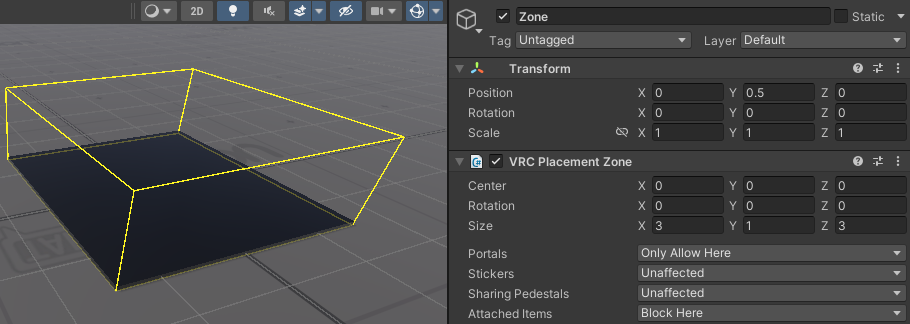
For the best results, you should slightly embed the zone inside the surfaces where you don't want placed objects to appear. This is especially relevant for stickers, which can be placed on any surface, not just the floor.
When moving zones around or changing placement rules dynamically, make sure the changes are synced over the network, since mismatched zones between users can result in unexpected behavior.
Note that placement zones don't remove content; they only prevent placement. For example, enabling a placement zone that prevents stickers being placed inside it does not remove any existing stickers in that zone.
Component Properties
| Parameter | Description |
|---|---|
| Center | The center position of the box in the game object's local space. |
| Rotation | The rotation of the box in the game object's local space. |
| Size | The width, height and depth of the zone within the game object's local space. |
| Portals | Controls how this zone affects placement of portals. |
| Stickers | Controls how this zone affects placement of stickers. |
| Sharing Pedestals | Controls how this zone affects placement of sharing pedestals. |
| Attached Items | Controls how this zone affects placement of items attached to surfaces. Items that spawn without being attached to a surface, such as pickups, are not affected. |
Permission Options
The options for allowed content work like this:
- Unaffected: The zone does not affect this content type.
- Block Here: The zone blocks this content inside it. It still allows placement elsewhere.
- Only Allow Here: The zone only allows this content inside it. It blocks placement elsewhere unless another 'Only Allow Here' zone allows it. (See below)
Combining Placement Zones
Combining multiple placement zones together in a world has the following effect:
- If two zones both block placement inside them, users can still place content in the area that's outside both of them.
- If two zones both only allow placement inside them, users can only place content inside either zone (or both if they overlap), not outside.
- If one zone only allows placement inside it and another blocks placement inside it, and the two zones are overlapping, users can still place content inside the overlapping area. A blocking zone fully contained in an allowing zone has no effect.